Chipmunk
- 4.3
- Rating
- 50.00K
- Installs
- Free
- Price

 Analysis by App-foxy
Keeping track of a child’s school transportation can be surprisingly stressful. Pickup times change, buses run late, and a quick message from a school or transport provider can be easy to miss when the morning is already busy. Chipmunk, developed by BusPlanner Inc., takes a focused approach to that problem: it is a travel and local app built to help parents stay informed about their children’s transportation. After spending time with it, my view is clear: Chipmunk is most useful when your child’s school transportation already connects to the BusPlanner system, because its value comes from turning transport updates into something easier to follow.
This is not a general journey planner, a public transit map, or a replacement for every school communication channel. Its purpose is narrower and more practical. Rather than asking parents to piece together information from paper notices, emails, phone calls, and memory, it gives transportation updates a dedicated place. That limited scope is also its main strength: when the service is supported, the app can make a routine part of family life feel more manageable.
How Chipmunk fits into a parent’s daily routine
The store summary describes the app as a way to keep up to date on children’s transportation, and that is the right way to understand it. I would not install it expecting broad travel features or a collection of unrelated local services. Chipmunk is designed around the parent’s need to know what is happening with a child’s ride to or from school.
You May Also Like

 Blood Strike: 2.5 Anniversary
Blood Strike’s Loadouts Turn Every Drop Into a Tactical Gamble
A close look at Blood Strike’s custom loadouts: how fast access to signature weapons reshapes its battle royale rhythm, rewards preparation, and narrows the gap between fights.

 Pandora - Music & Podcasts
Pandora’s Music Is Easy to Start, but Harder to Recover
Pandora’s strength is its low-effort path from a seed to a station. Its weak spot is how much confidence it asks you to place in connection, setup, and quiet recovery.

 8 Ball Pool
8 Ball Pool Is Built on Rivalries, Rematches, and Routine
A close look at the rivalries, rematches, shared routines, and unanswered safety questions that turn a quick pool match into a persistent mobile community.

 Samsung Music
Samsung Music’s Quiet Strength Is Playing What You Already Own
Its reach comes less from spectacle than from dependable access to a personal library. That simplicity is both the app’s strongest retention engine and its ceiling.

 AccuWeather: Weather Radar
AccuWeather Review: A Quick, Clear Forecast for Everyday Decisions
For everyday plans, the best forecast is the one you can understand quickly. AccuWeather makes rain timing, radar, and local conditions easy to act on, with a few trade-offs.

 Hill Climb Racing
Why Hill Climb Racing Still Turns Crashes Into One More Run
A tiny car, a bumpy hill and one more upgrade: Hill Climb Racing keeps resurfacing because its simple chaos makes every near-miss feel personal.
More From Our News Desk



That distinction matters because many families do not need another app full of maps, ticket options, destination searches, and tourist information. They need a dependable place to check transportation information without searching through a crowded inbox. Chipmunk’s Travel & Local classification may sound broad, but the practical experience is much more specific: it is a school-transportation companion.
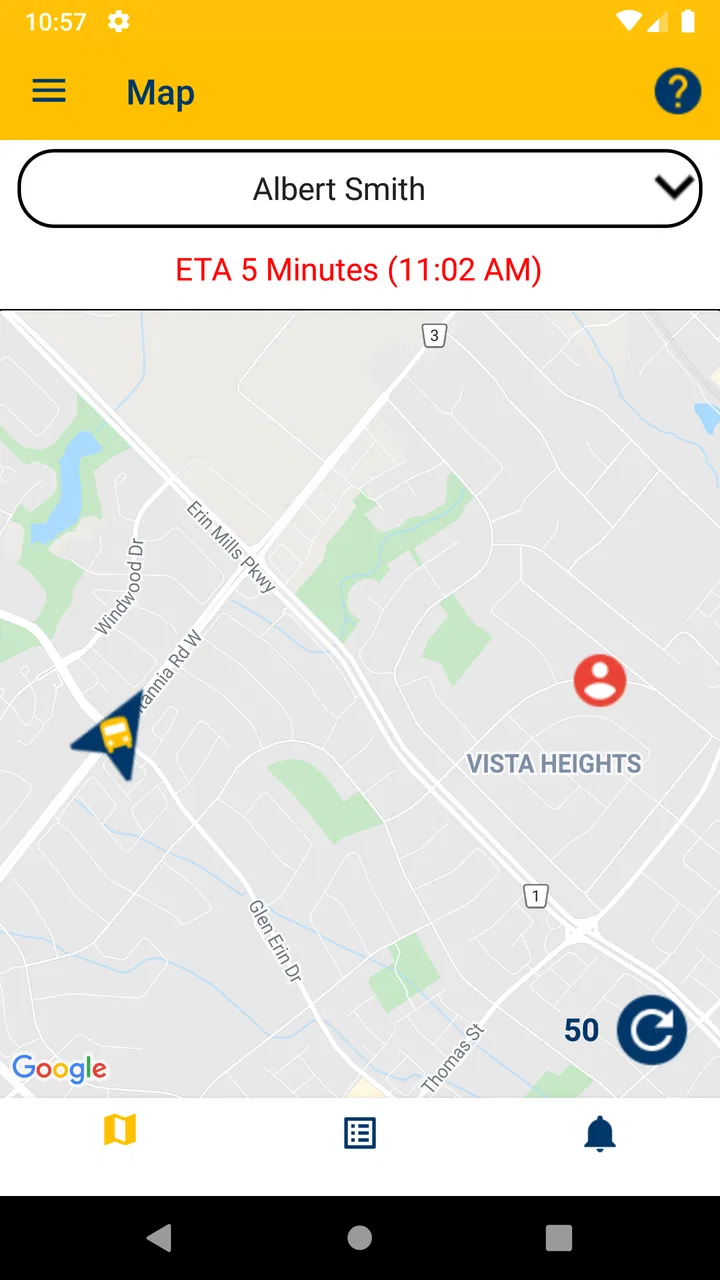
In an everyday scenario, I can imagine using it before leaving for work. A child may usually board at a familiar stop, but a delayed vehicle or a changed arrangement can affect the entire morning. Instead of relying only on a remembered schedule, I would open Chipmunk and check the latest information available through the connected transportation service. That does not remove every uncertainty, but it gives the parent a clearer starting point.
The same idea applies in the afternoon. A parent working from home may need to know whether the child’s ride is progressing normally before stepping away from a meeting. Another parent may be arranging a pickup and want current transportation information rather than an assumption based on yesterday’s timing. The app is valuable in these small moments, where a little more visibility can prevent unnecessary calls and confusion.
The strongest reason to use it
Chipmunk’s best quality is its focus. Because the app is centered on children’s transportation, the information a parent is looking for should be easier to find than it would be in a general-purpose travel app. That sounds simple, but simplicity is important when the user is checking a phone quickly while preparing breakfast, commuting, or coordinating with another caregiver.
I also like the idea of separating transportation awareness from ordinary messaging. A school may send many kinds of announcements, and transportation details can become buried among reminders, event notices, and administrative updates. A dedicated app gives the transport part of the routine its own place. For families who regularly need this information, that separation can be more useful than a feature-heavy alternative.
Another practical strength is that it supports shared responsibility. Parents, guardians, and other trusted adults may all be involved in getting a child to and from school. A transportation-focused app can reduce the need for one person to act as the sole source of information. That is especially helpful when schedules change during the day and the adult handling pickup is not the same person who handled the morning routine.
My advice is to treat Chipmunk as a quick-check tool rather than something that should replace common sense. If a child is waiting at a stop, the adult should still use the normal safety habits for that situation. The app can improve awareness, but it cannot supervise the child or guarantee that every real-world event will be reflected instantly.
Where the app can save time
The most useful workflow is to make Chipmunk part of existing routines instead of opening it only after a problem appears. A parent could check transportation information before the child leaves home, then check again when planning afternoon pickup. This creates a simple habit and reduces the chance of discovering a change only after the expected arrival time has passed.
A second useful habit is to agree with other caregivers about which information should be checked in the app and which situations require direct contact with the school or transportation provider. This avoids duplicated calls and prevents two adults from making different assumptions. The app is at its best when it becomes the shared reference point for ordinary updates, while urgent or unusual concerns are handled through the appropriate human channel.
A less obvious benefit is that a dedicated transportation app can make schedule changes easier to discuss. If a child says the bus was different or arrived at an unusual time, a parent has a specific place to compare that report with the available transportation information. That does not turn the app into an official incident record, but it can make family conversations more concrete than relying on vague recollections.
There is also a useful trade-off here. A narrow app may feel less impressive than a large family-planning platform, but it can be faster for one specific task. If the only question is whether a child’s transportation is proceeding normally, a specialized tool is often preferable to navigating through calendars, email threads, or a general transit application.
What I would check before depending on it
The first question is whether your child’s school or transportation provider supports Chipmunk. The app’s usefulness depends heavily on that connection. If the organization handling the route does not use the service, installing the app alone will not create transportation information. I would confirm support before asking a family to make it part of its daily routine.
The second question is how your family should respond when information appears late or does not match what is happening outside. No transportation app should be treated as a perfect substitute for the school’s established communication process. If a child is missing, a stop changes unexpectedly, or a safety concern arises, I would contact the responsible organization directly rather than waiting for an app update.
It is also worth deciding who in the family should use it. Giving access to every relative may create unnecessary confusion, while limiting it to one parent can make the system less useful during work hours. A small household agreement about who checks the app, who handles pickup, and who contacts the school can make the technology work better than simply installing it and hoping everyone uses it the same way.
Limitations that affect the recommendation
Chipmunk’s focused design is not right for everyone. If you are looking for route planning across a city, live public transit comparisons, walking directions, or ticket information, this is the wrong kind of app. A conventional transit application will be better for planning your own journey. A family calendar may be better for combining school events, appointments, sports, and household responsibilities in one place.
Even for parents, the app may not cover every transportation question. It is aimed at keeping users informed, not at replacing the school office, bus operator, or a direct conversation with a child. Parents who need detailed control over multiple types of school communication may prefer a broader school portal. Those who only need an occasional reminder may find that their existing calendar and messages are sufficient.
The app also depends on the quality and timing of the information connected to it. A clean interface cannot correct an update that arrives late from the underlying transportation operation. This is an important distinction: Chipmunk can organize available information, but it cannot control traffic, vehicle breakdowns, staffing problems, weather, or decisions made by a school. I see the app as a visibility aid, not a promise of certainty.
That limitation does not make it unhelpful. It simply changes how I would recommend using it. I would rely on Chipmunk for routine awareness and use direct communication for exceptions. Families that understand that boundary are more likely to appreciate the app, while families expecting guaranteed, minute-by-minute certainty may be disappointed.
Who is most likely to appreciate Chipmunk
The clearest audience is parents and guardians whose children use a supported school transportation service and whose days involve frequent coordination. It should also suit households where more than one adult shares morning or afternoon responsibilities. In those situations, a dedicated place for transportation updates can reduce the number of small questions that otherwise move through text messages and phone calls.
I can also see value for caregivers who are not the child’s primary parent but regularly handle school pickup. Grandparents, relatives, and other approved adults may benefit from having transportation information available without asking another family member to forward every update. Whether that arrangement is appropriate depends on the family’s own privacy and access decisions, but the use case is clear.
Chipmunk may be less useful for a child who walks to school, is driven privately every day, or uses transportation only occasionally. It is also a weak fit for someone who wants one app to manage the entire family calendar. In those cases, a calendar, school portal, or general messaging system may provide more value with fewer apps to maintain.
The app is free, which removes one common barrier to trying a specialized service. It is rated for Everyone, so its intended audience is broad, although the practical user is usually the adult responsible for a child’s transportation. Its current version is 2.12.0 and it supports devices running Android 5.0 or later, details that make it accessible to many older Android phones as well as newer models.
Chipmunk has reached over fifty thousand installs, with an average rating of 4.4 from 446 ratings and 134 reviews. Those figures suggest that the app has found a real audience, but I would still judge it mainly by whether your school or transportation provider supports it. For this kind of service, compatibility with the local transportation arrangement matters more than popularity alone.
How it compares with familiar alternatives
Compared with email, Chipmunk should be easier to use for transportation-specific checks because the relevant information has a dedicated home. Email remains useful for official notices and unusual announcements, but it is not always the quickest way to answer a routine question about a child’s ride.
Compared with text messages, the app can reduce dependence on one person forwarding updates to everyone else. Texting is still better when a situation needs a personal explanation or a quick conversation. Chipmunk’s role is more structured: it helps people look up transportation information, while messaging handles coordination and exceptions.
Compared with a general public transit app, Chipmunk is more relevant to school transportation but less useful for planning an adult’s journey. A city transit tool may show routes, stops, transfers, and broader travel options. Chipmunk is the better choice only when the question is tied to a child’s school transportation and the relevant service is connected.
Compared with a family calendar, Chipmunk should offer a more direct way to check transport-related information, while the calendar remains better for long-term planning. I would not choose between them as if they were substitutes. A calendar can record the expected schedule; Chipmunk can help with current transportation awareness. Using each for its proper job makes more sense than forcing one tool to handle both.
My final recommendation
After reviewing Chipmunk, I see it as a practical specialist rather than a complete family mobility platform. Its thesis is simple and convincing: parents benefit from having children’s transportation information in a focused app instead of scattered across ordinary communication channels. The strongest evidence is its clear purpose and the way that purpose fits real routines such as morning checks, afternoon pickup, and shared caregiving.
My main reservation is equally clear. The app cannot be useful without support from the transportation organization, and it cannot guarantee that real-world events will always appear immediately or perfectly. That means I would not recommend it as the only source of truth in a safety-sensitive situation. I would recommend it as a convenient layer of awareness alongside the school’s normal contact methods.
If your child uses a supported service, Chipmunk is worth trying because it is free, focused, and easy to understand. Set it up before a busy school week, decide which adults should rely on it, and agree on when a direct call is still necessary. If your needs are broader than school transportation, choose a family organizer or public transit app instead.
My final verdict is positive but specific: Chipmunk earns its place when transportation updates are a recurring part of family life. It will not solve every school-day problem, and it is not meant to. But for the parent who wants a clearer, quicker way to stay aware of a child’s ride, this focused approach makes good sense.
FAQs for Chipmunk
01What is Chipmunk, and what can I use it for?
Chipmunk is an app designed to help users manage and organize everyday information in a simple mobile interface. Depending on the version available in your region, its tools may include account management, content browsing, personalization, notifications, and other convenient features. Before downloading, check the official store description to confirm the exact functions supported on your Android or iOS device.
02Is Chipmunk free to download and use?
Chipmunk may be available as a free download, but some features could require in-app purchases, a subscription, or an account. The basic installation cost and any optional charges can vary by platform and country. We recommend reviewing the app’s store listing, pricing section, and subscription terms before confirming a purchase, especially if you plan to use premium tools regularly.
03Does Chipmunk require registration or personal information?
Some Chipmunk features may work without an account, while others can require registration to save preferences, synchronize data, or access personalized content. During setup, the app may request information such as an email address or permission to send notifications. Read the privacy policy carefully and provide only the permissions and details you consider necessary for your intended use.
04Is Chipmunk safe to install on Android and iPhone?
Chipmunk should be downloaded only from the official Google Play Store or Apple App Store to reduce the risk of modified or harmful copies. Before installing, verify the developer name, recent updates, user reviews, requested permissions, and privacy information. No app can guarantee complete risk-free use, so keep your device updated and avoid unofficial download links.
05What should I check before downloading Chipmunk?
Before downloading Chipmunk, confirm that your phone meets the required operating-system version and has enough available storage. Also check whether the app is supported in your country, needs an internet connection, contains advertising, or offers paid subscriptions. Reviewing recent user feedback is useful as well, since performance, compatibility, and available features may differ between Android and iOS devices.
Pros
- Simple interface that is easy to understand from the first launch.
- Lightweight design helps it run smoothly on many devices.
- Useful tools are organized for quick access.
- Clear visual feedback makes actions easy to follow.
- Suitable for users who prefer a focused
- distraction-free experience.
Cons
- Some features may feel limited compared with more advanced alternatives.
- The interface can appear basic for users seeking extensive customization.
- Performance may vary on older or less powerful devices.
- Certain functions may require extra permissions to work properly.
- Updates and support may not be as frequent as users expect.

Chipmunk
Gallery